New Overnight Inquiries is the panel at the bottom of the home dashboard that surfaces patient inquiries received after hours. When you sit down in the morning, anything that came in since 5 PM yesterday is queued up in one place so you do not have to scan the full Inquiries page to find it.
Quick answer
Open the dashboard. Scroll to the bottom. The New Overnight Inquiries panel sits below Care Plans Due for Review. Each row shows a patient name, the inquiry subject, and how long ago it was received. Click View to open the thread, Convert to turn it into a referral, or Dismiss to hide it from the panel for the rest of the day.
1. Open the dashboard and scroll to the panel
Land on the home dashboard.
The dashboard is the first page after sign-in. The Overnight Inquiries panel is the last block on the page, below Care Plans Due for Review.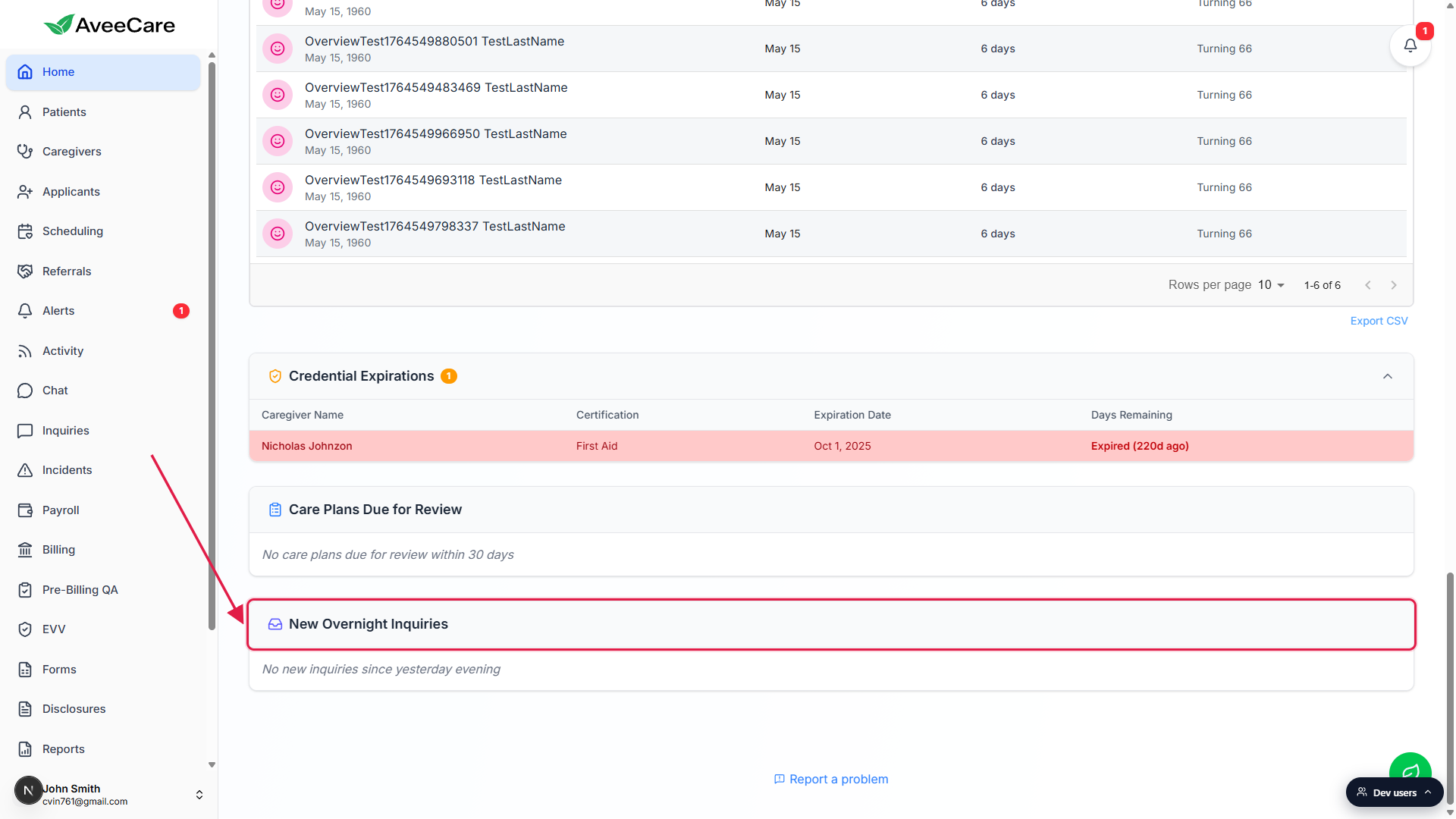
Look for the inbox icon and the badge number.
The panel header reads New Overnight Inquiries with a small inbox icon. When inquiries are queued, an indigo badge to the right of the title shows the count. When the panel is empty you see No new inquiries since yesterday evening.
2. Read the row and pick an action
Each row is one Open inquiry submitted since 5 PM yesterday.
The row shows the patient name on top, the inquiry subject underneath, and a Received timestamp at the bottom (e.g., Received 7 hours ago). Rows are sorted newest first.Three buttons sit on the right of every row.
- View opens the Inquiries page so you can read the message and reply.
- Convert jumps to the Referrals page with the convert-inquiry flow loaded for this inquiry. Use this when the inquiry is from a prospect, not an existing patient.
- Dismiss hides the row from the panel for the rest of today. The inquiry itself is not changed; it still shows on the Inquiries page. The panel re-evaluates dismissals each calendar day, so dismissed rows come back tomorrow if they are still Open and within the cutoff.
3. View the inquiry, reply, then resolve or convert
Click View to land on the Inquiries page.
The list of inquiries is on the left, the selected thread on the right. The thread shows every message in date order, with the most recent at the bottom.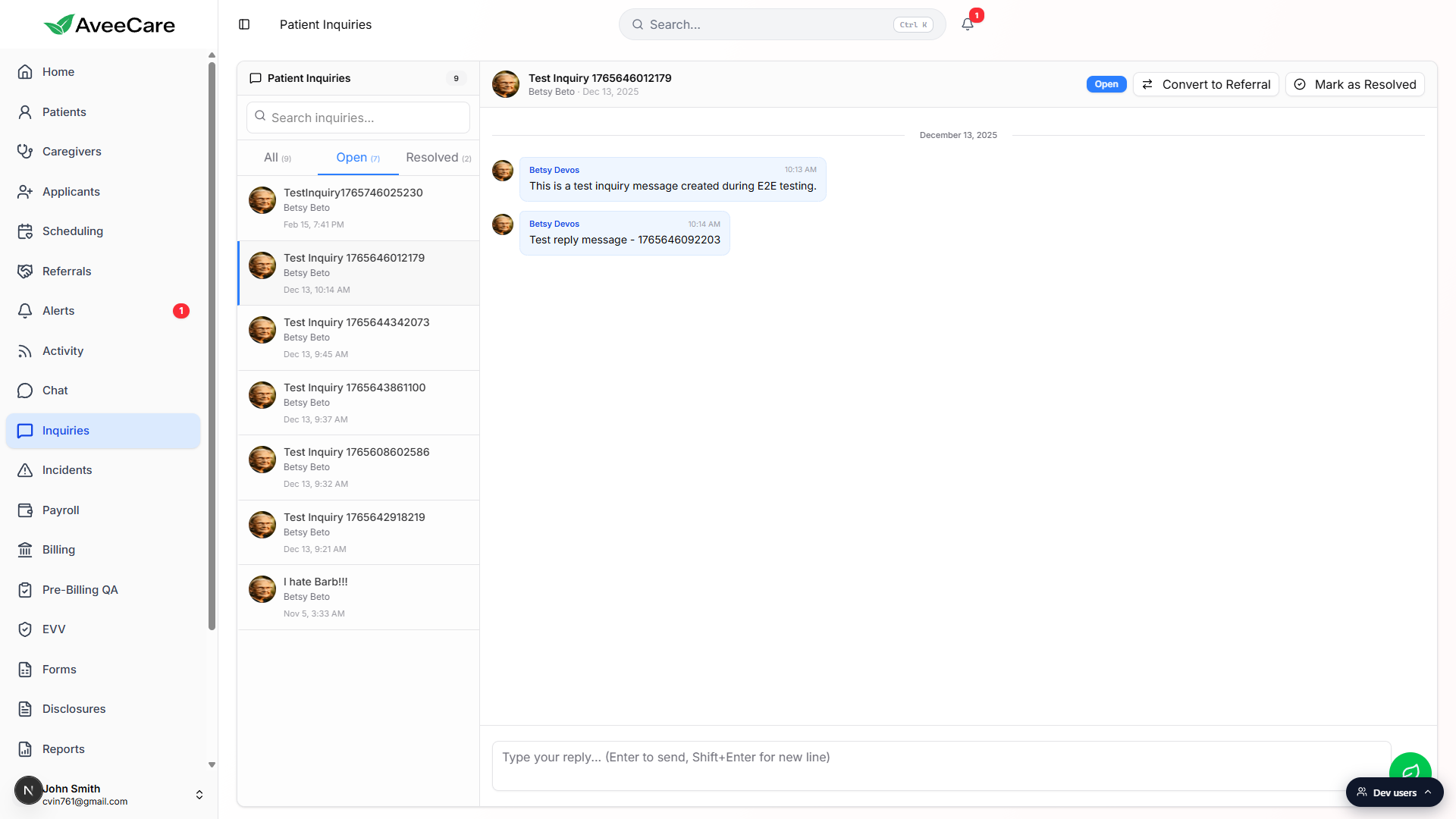
Type a reply in the composer at the bottom.
The placeholder reads Type your reply (Enter to send, Shift+Enter for new line). Replying does not close the inquiry. The status stays Open until you change it.Pick a final state in the top right of the thread.
Click Mark as Resolved when the patient question is answered, or Convert to Referral when the message is a new-client inquiry that should become a referral record. Resolving removes the row from the Open tab and from the overnight panel.
How the overnight cutoff works
The panel pulls every inquiry whose status is Open and whose creation time falls between 5 PM the previous calendar day and the current moment. There is no “business hours” configuration applied here; the 5 PM boundary is a fixed rule. Inquiries created earlier than 5 PM yesterday do not appear in this panel even if they are still Open. Use the Inquiries page Open tab for the full backlog.
If your account has multiple offices and you have an office selected at the top of the dashboard, the panel only shows inquiries tied to patients in that office. Switch the office filter to All offices to see every overnight inquiry across the agency.
Common pitfalls
- Treating an empty panel as broken. Most overnights are quiet. No new inquiries since yesterday evening is the default state and means exactly what it says, no Open inquiries arrived after 5 PM yesterday.
- Dismiss is not Resolve. Dismiss only hides the row from the panel for the day. The inquiry stays Open on the Inquiries page. To actually close it, open the thread and click Mark as Resolved.
- Office filter hiding rows. If your dashboard is scoped to a single office and the inquiry belongs to a patient in another office, it will not appear here. Switch to All offices if a row you expect is missing.
- Looking for inquiries from earlier yesterday. The cutoff is 5 PM. Anything submitted between, say, noon yesterday and 4:59 PM yesterday is on the regular Inquiries Open tab, not in this panel.