Referrals and prospects, from first call to first visit.
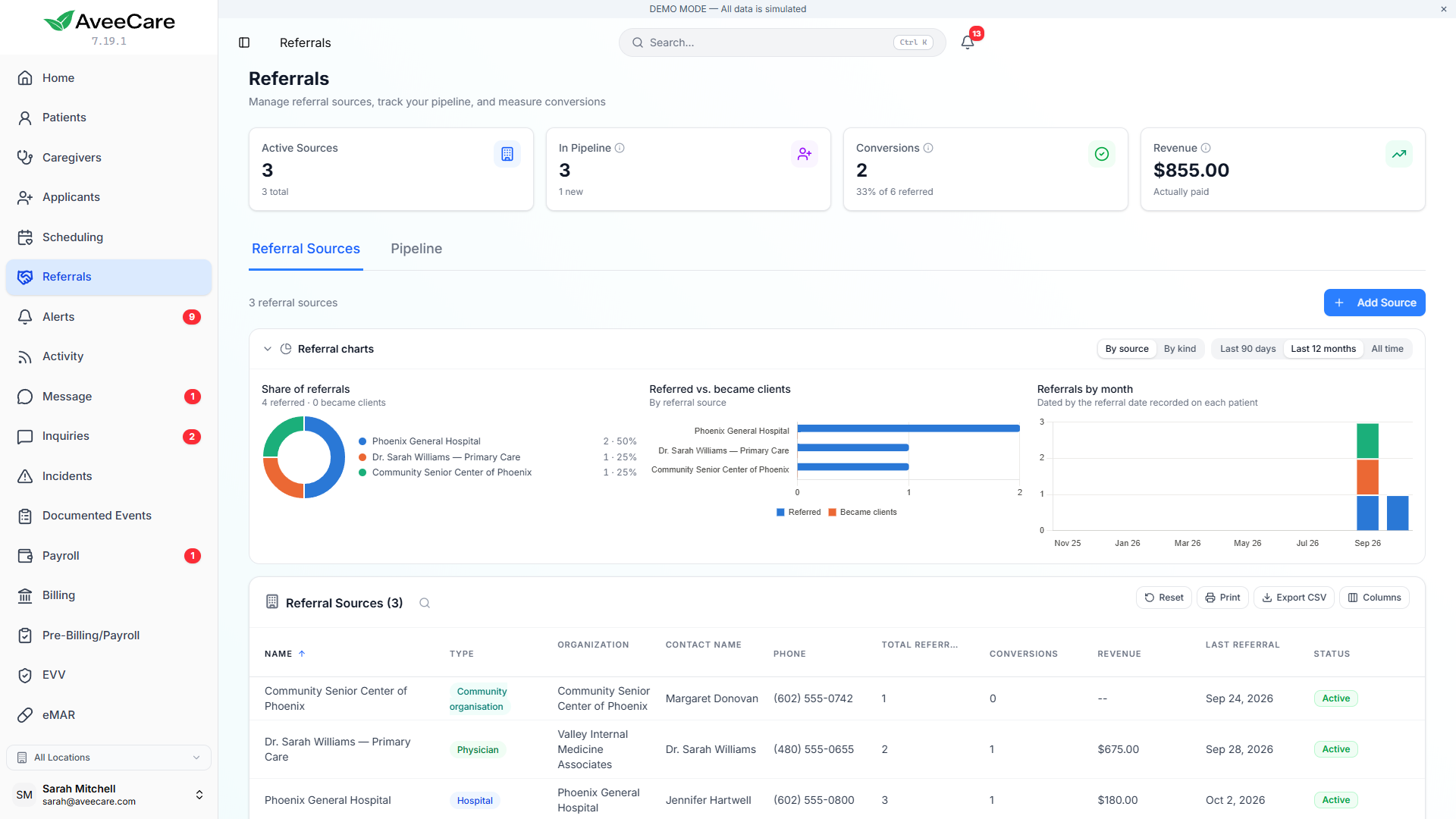
Keep everyone who might become a client in one pipeline, see what is still missing before you can admit them, and learn which hospitals, hospices, doctors and clients actually send you business.
What the referrals pipeline gives you
Prospects are not billed
A prospective client has the same record they will have as a client, with contacts, notes, files and forms, but is never counted toward your monthly bill until you admit them.
What is still missing
Each prospect shows a Next step and a progress bar built from six things you need before care starts: name, phone, address, date of birth, care needed and who pays.
Referral sources that stay tidy
Pick a source or add a new one without leaving the form. Hospitals, doctors, hospices and your own current or past clients each have their own kind.
Numbers from real records
Referred, converted and lost are counted from the people attributed to each source, and revenue only from invoices that were actually paid.
The first call
Record the person who called, not just the person needing care
Add a new prospective patient from Referrals or Patients. Under Who we spoke to, record the caller’s name, relationship, phone and email. The client’s own phone and email can wait.
A website enquiry becomes a prospect with Make Prospect. The sender’s phone and email go onto the caller, unless they said the care is for themselves, and the ZIP code and care needed are filled in from your enquiry form’s answers.
- Notes, documents, medications, care goals, forms and disclosures can all be added before admission.
- Prospects appear in the visit scheduler marked Prospective, so you can book a free in-home assessment first.
- Saving a visit for a prospect asks whether to admit them and schedule, schedule anyway, or cancel.
Admission
Admitting is a change of status, not a copy
When you admit a prospect, their record simply becomes a client record, so nothing collected during intake is left behind. The admit screen lists anything still missing and who will be added to the client’s Contacts tab, and the caller goes there with their relationship, phone and email.
Missing paperwork is a warning you can read, not a block. Admitting someone before every form lands is normal when care has to start tomorrow.
Referral sources
See which partners actually send you clients
The Referrals page shows each source’s share of referrals, how many were referred compared with how many became clients, and referrals by month, over the last 90 days, the last 12 months or all time. Group the charts by kind to see every hospice together.
Credit clients you already had to the source that sent them, from their Overview, from Modify Patient, or for many clients at once from the Patients page, with a backdated referral date. A Referred By column shows the source on the Patients list.
- Open a source to see the patients it sent you and when.
- Conversion rate stays blank for a source with no referrals yet, rather than reading as 0%.
- Open pipeline value comes from each prospect’s own hours and rate and is labelled as an estimate.
- Referral Source Analysis, Referral Source Performance and Revenue by Referral Source reports count every attributed client.
Know where your next client is coming from
Keep every lead in one pipeline, admit them when they are ready, and see which partners deserve your next visit.