Denials, deadlines and secondary claims, worked from one tab.
The Insurance claims tab on Billing puts the claims that need a person first: what was denied and what to do about it, which claims are close to their filing deadline, and which can go on to a secondary payer.
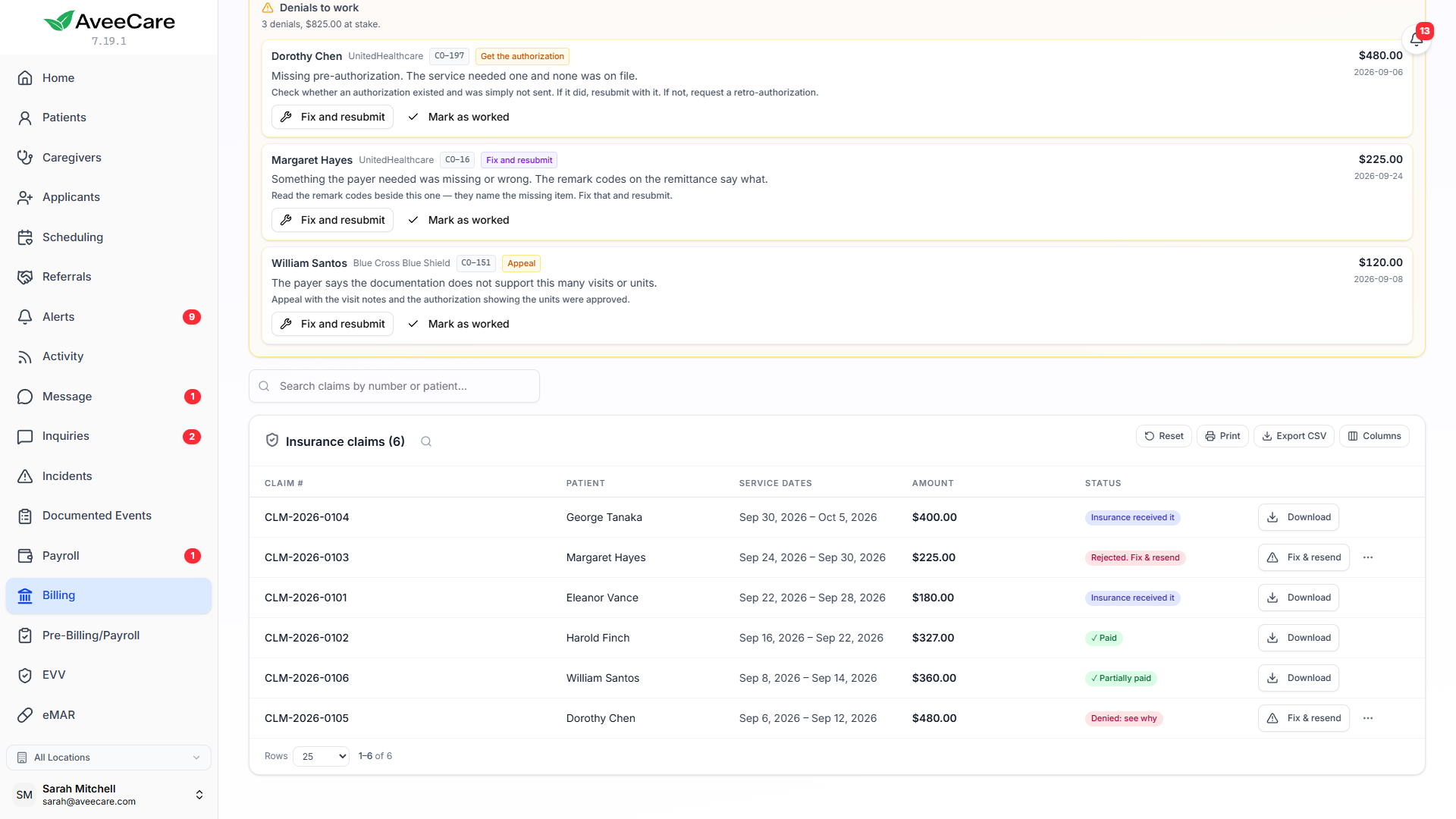
What the claims worklists give you
Denials to work
Every denied, rejected or underpaid claim, ordered by money, with the payer’s adjustment code turned into what a biller actually does about it.
Filing deadlines
Each payer’s timely filing limit lives on the payer record, and the panel lists claims not yet sent to the payer by how many days are left, naming the date.
Secondary claims
When a primary payer has paid, the patient responsibility can go on to the secondary payer with the primary’s payment on the claim.
Payer enrollment
Track EDI, ERA and EFT enrollment for each payer, including where that payer’s remittances are actually going.
Denials
A next step only where we know the next step
The amber Denials to work panel sits above the claim list. Each row is one claim, with the payer’s own description of the adjustment, the amount at stake and two ways out on the row.
For the adjustment codes that turn up most on home care and Medicaid remittances, the row says what a biller does next. For any other code the row shows the payer’s own wording and says plainly that there is no suggested step, so nobody acts on a guess.
Timely filing
The deadline that cannot be appealed
Set each payer’s filing limit in Settings under Clearinghouse & Claims. The rose Filing deadlines panel is first on the Insurance claims tab and lists claims that have not gone to the payer yet by how many days are left: expired, within 14 days, within 30 and within 60.
A payer with no limit set still appears, asking you to add one, because a payer nobody has configured is itself the risk. Expired rows are kept, so you can see why something was late. Nothing here stops you from billing or submitting.
Coordination of benefits
Bill the secondary for what it actually owes
The teal Ready for a secondary claim panel lists claims where the primary has paid and the client has another payer. Only patient responsibility, such as a deductible or coinsurance, goes to the secondary. The contractual write-off does not.
The panel names the split, for example how much can go to the secondary and how much is a write-off billable to nobody. When the remittance states no patient responsibility, AveeCare does not guess that any is owed.
Getting paid
When claims go out and nothing comes back
Before you can send claims and receive remittances through a clearinghouse, each payer needs EDI enrollment, ERA enrollment and EFT set up. If the ERA is still pointed at your previous vendor, claims go out fine and no payments come back.
Settings, Clearinghouse & Claims, Getting paid through us tracks all three for each payer and where that payer’s remittances are routed, with notes.
When the clearinghouse is down
Download the claim file and upload it yourself
If the clearinghouse is unavailable you can download the batch as an 837P file and upload it to the payer’s portal. Downloading does not mark anything as sent. AveeCare tells you the claims in the file are still waiting, and you mark them submitted when you have actually uploaded them, so the next batch does not send them twice.
Work the claims that are costing you money first
Denials by amount, deadlines by date and secondary claims by what is actually owed, on the tab you already bill from.