EVV Dashboard
A single view of every EVV visit across your agency. See status counts at a glance, filter by date, status, or state, and take bulk or per-visit actions without leaving the page.
Try EVV in DemoStatus Overview
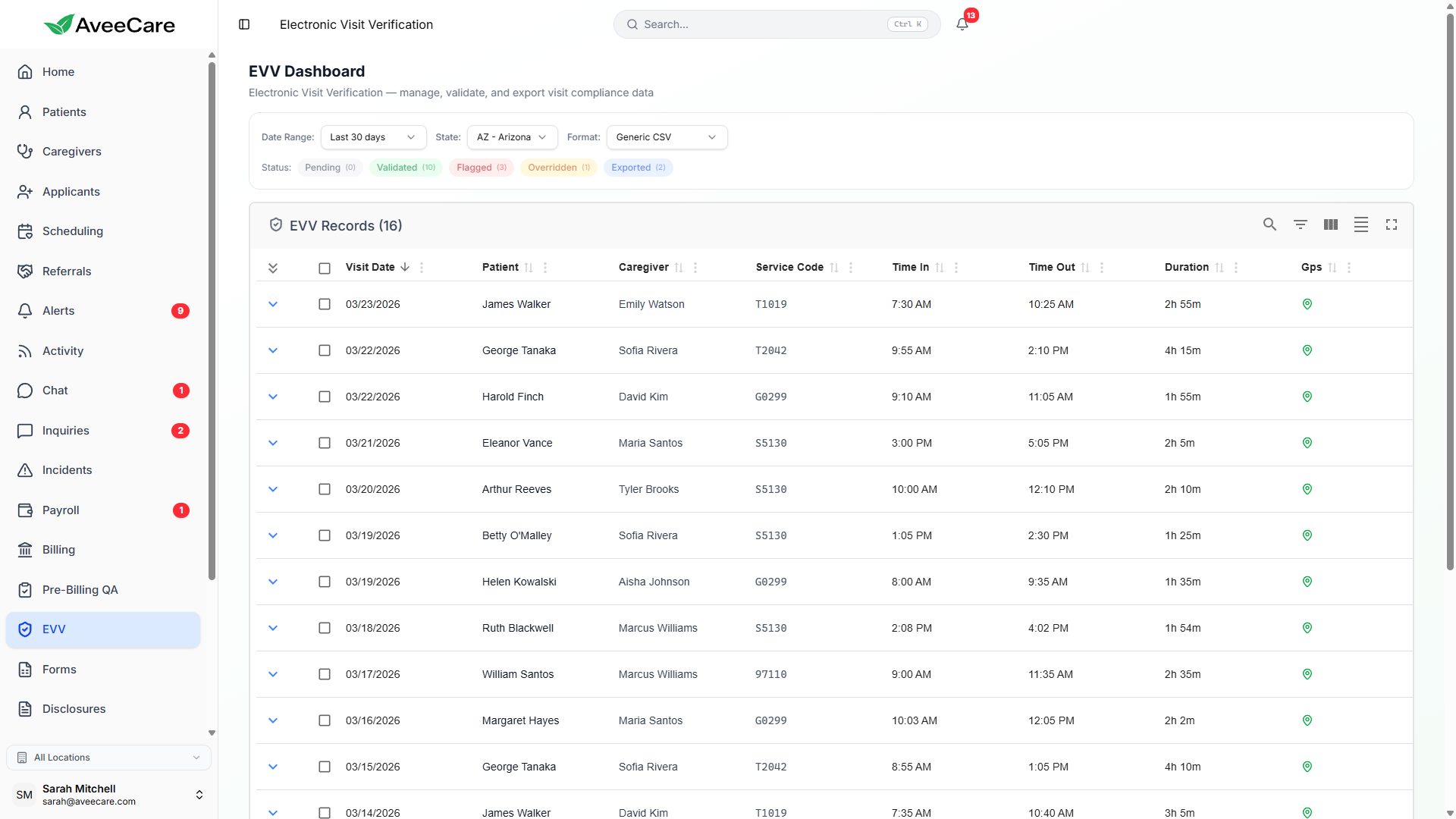
The top of the EVV dashboard shows live counts for each visit status. Click any status card to filter the table below to only visits in that status.
Awaiting validation
Passed all checks
Needs review
Admin approved
Sent to aggregator
Filtering & Search
Narrow down visits using multiple filter dimensions. All filters are combinable and the table updates in real time as you apply them.
Date Range
Pick a start and end date. Presets available for This Week, Last Week, This Month, Last Month, and custom ranges.
Visit Status
Filter by one or more statuses: Pending, Validated, Flagged, Overridden, or Exported. Multi-select supported.
State
Filter visits by the patient's state. Essential for multi-state agencies exporting to different aggregators.
Caregiver
Search by caregiver name or ID to view all visits for a specific worker across the date range.
Patient
Search by patient name or Medicaid ID to see all visits for a specific member.
Service Code
Filter by procedure/service code to isolate specific programs or service types.
Data Table
The main table shows every visit matching your filters. Columns are sortable and resizable. Here is what each column displays.
Bulk & Per-Visit Actions
Bulk Actions
Select multiple visits using checkboxes and apply actions in batch. Available bulk actions depend on the selected visits' current statuses.
- Bulk Export: Export all selected Validated or Overridden visits in your chosen format
- Bulk Override: Override multiple Flagged visits at once with a shared justification
- Bulk Re-validate: Re-run compliance checks on selected visits after data corrections
- Bulk Mark as Exported: Manually mark visits as exported if uploaded outside AveeCare
Per-Visit Actions
Click on any visit row to expand its detail view, or use the action menu for quick operations.
- View Detail: See all captured EVV data, GPS map, signatures, and compliance check results
- Override: Review and approve a Flagged visit with documented justification
- Export: Export a single visit in your selected format
- Edit: Correct data fields (e.g., service code, authorization number) and re-validate
- Void: Remove a visit from export consideration with a documented reason
Exception, Reason & Resolution Codes
When a visit can't follow the standard flow, AveeCare uses a three-layer code system to document exactly what happened, why, and how it was resolved. These codes are included in export files for aggregator compliance.
Exception Codes
What happened that deviated from the expected visit flow.
EXC-001Service Location ChangeVisit occurred at a different location than the registered patient address (e.g., hospital, community outing).
EXC-002GPS UnavailableCaregiver device could not capture GPS coordinates (e.g., poor signal indoors, device permission denied).
EXC-003Member UnavailablePatient was not present at the scheduled visit time. Caregiver documented the situation and followed protocol.
EXC-004Early/Late ClockCaregiver arrived significantly early or late compared to the scheduled time.
EXC-005Device MalfunctionCaregiver device experienced a technical issue preventing normal EVV data capture.
Reason Codes
Why the exception occurred.
RSN-001Patient HospitalizedPatient was hospitalized and not available at their home address.
RSN-002Weather/EmergencySevere weather or emergency conditions affected visit timing or location.
RSN-003Caregiver SubstitutionA different caregiver covered the shift on short notice.
RSN-004Schedule ChangePatient or agency requested a schedule change after the visit was assigned.
RSN-005Community ActivityVisit involved an approved community-based activity outside the home.
Resolution Codes
How the exception was resolved.
RES-001Admin OverrideAn administrator reviewed the flagged visit and approved it for export with documented justification.
RES-002Data CorrectedMissing or incorrect data was corrected by the caregiver or admin and the visit was re-validated.
RES-003Visit VoidedThe visit was voided and will not be submitted for reimbursement.
RES-004Documentation AddedAdditional documentation was attached to support the visit (e.g., signed paper form).
State & Format Selector
Multi-state agencies can select a state from the dashboard header to instantly apply that state's EVV requirements and default export format. The entire dashboard — status counts, validation rules, and export options — adjusts to match.
What changes per state
- Default export format matches the state's aggregator
- Required verification methods are enforced
- Compliance checks are weighted per state rules
- Exception and reason code lists update to state-specific options
- Export file naming conventions follow state requirements
All EVV features included at $6/client/month.
No per-visit charges, no add-on fees, no long-term contracts.